Posts filed under How To
10 of the best smartphones for 2009 – and one winner
We’ve put together a list of 10 of the best smartphones of 2009, and chosen one winner, to help you make your choice this Christmas just that little bit easier.
And if you’re not convinced by our recommendations, check out our Smartphone Buyer’s Guide to see what essential features you should look for, then have a look at what smartphones are on offer at the moment – many at crazy prices as the mobile phone stores compete mercilessly for your hard earned cash!
Check out our 10 best smartphones after the jump.
Buyers Guide: How to find the best camera phone this Christmas
Looking for a good camera phone for Christmas? It’s a nightmare isn’t it! There are hundreds of them, all with different features and very different photo taking abilities.
Imagine if you could cut through all the hype, all the marketing spin and the needless features. How much easier would your life be if you knew at a glance the six essential features a camera phone needs to take great quality pictures?
Luckily, I’m listening! I’ve put together a buyers guide that does all of that for you, taking the hassle out of choosing camera phones, and showing you exactly what you need to get the perfect camera phone for you or your family this Christmas.
Read our “How to find the best camera phone” guide now, and take the stress out of Christmas!
Top 5 Ways To Backup and Safeguard Your Mobile Data
How much information have you got stored on your mobile phone? Think about it – your contacts, addresses, important and memorable texts, hundreds of photos and tunes, and now, of course, dozens of apps. Losing your phone is now more costly than buying a new one – your whole life’s stored on it.
Backing up your mobile data is therefore essential. But how do you do it?
Easy – you read the following guide on the top 5 ways to backup and safeguard your mobile data!
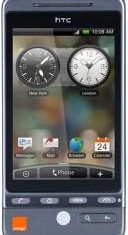
How to install the HTC Hero interface on the G1
The HTC Hero is a brand new Android phone that’s received all manner of awards as best mobile phone of 2009 (read our HTC Hero review for full details). One of the best features about the Hero is the fact that it has a brand new user interface – called Rosie, of all things! Rosie has bee developed by HTC to help it differentiate its Android phones from the myriad competitors that are now appearing.
The new user interface has been designed from the ground up to give Android a super-slick polished look. It’s not just a port of HTC’s TouchFLO user interface that it created for Windows Mobile. It’s a brand new dedicated Android interface that looks super-slick, has a nifty new Web browser and great new music player, among many many other enhancements.
But what if you’ve already got a T-Mobile G1 with the “vanilla” Android user interface? Are you forced to watch your HTC Hero-sporting friend gloat over the greatness of his new phone’s UI while you’re stuck with your G1’s UI for the next year or so?
Fear not. If you’ve got the technical chops, patience, and balls of steel, you too can port the HTC Hero’s user interface over to your T-Mobile G1. Be warned – it’s not easy!
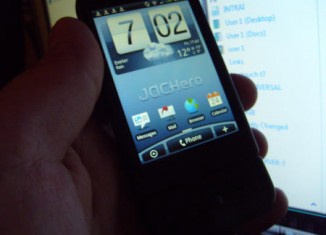
But it can be done, and my brother Dave (@terminal7) has proved it by successfully upgrading his G1. You can see the pics he took of his new Hero G1, plus videos and details on how to do it after the jump.
How to keep a girl quiet with a mobile phone

Ok, so this must rank as one of the more unconventional of my periodic how to articles, but I’ve inadvertently found another use for my increasingly indispensable Nokia E90 – keeping a girl occupied on long journeys :)
I’ve just travelled to Devon for the weekend, which took about 3 hours or so, and had a passenger with me with the attention span of a hamster with ADHD. Trying to find some way of fending off the constant “are we nearly there yet?”s, I was looking for some way to occupy her that didn’t involve earplugs (too obvious) or a gag (even less subtle!)
With a characteristic flash of inspiration, I had it – my Nokia E90 and Facebook! Now all I had to worry about was how well the E90 would be able to hold its HSDPA connection as I travelled at, er, around 70mph! As road tests go, this would be the ultimate – how did the E90 fare?…
Links and tips on how to unlock your phone

Many mobile network operators lock a mobile phone to their network, ensuring you can’t just up and leave them whenever you feel like it. They do this by locking your phone’s SIM to the phone itself, so no other SIM will work in it. But what if you do want to switch networks? What if you want to leave your old contract and go to a shiny new (and cheaper!) operator, or just switch SIMs to use a local operator’s network when you travel abroad?
For this, you need to unlock your phone, and it’s not as difficult (or illegal!) as you might think. To show you how, we’ve compiled a handy guide on how to unlock your mobile phone, which includes a bag of links, free software and even books on unlocking phones.
Read how to unlock a mobile phone.
HowTo: configure your mobile phone for email

Ever since BlackBerry turned a nation of phone users into email-addicts, most mobile phones these days enable you to access your email.
However, to set your phone up for email access requires a few steps that aren’t immediately obvious. Fortunately, help is at hand. This How To will guide you through the process, helping you to configure your phone to access an existing email account.
HowTo take decent photos on a camera phone
Virtually all new mobile phones now have a camera within them of some description, from the basic VGA 0.3 megapixel variety, through the current generation of 2 megapixellers, to the top-of-the-line, only-in-Japan 7 megapixel behemoths. Despite a recent survey by StrategyAnalytics Inc. showing that only 28.5% of people actually use their phone’s camera features (and an even more alarming 2.9% use picture messaging to send the photo), the manufacturers are insistent on the mobile phone being the gadget of choice for the masses; as such, it simply must have a camera!
But does this mean that you can throw away your camera and rely solely on your phone? Well, no – just try taking a photo on your phone in poor light and you’ll see why! However, by making use of some of the features within a mobile phone’s camera, you can overcome these limitations, and get the most out of your phone’s camera.
Have any tips of your own, or comments on how well your phone’s camera performs? Feel free to add them here.
HowTo: Install Java J2ME midlets on your mobile phone
Ah Java – a once massively hyped future-of-the-web-technology, now a ubiquitous, its-everywhere-but-you-never-see-it kind of thing. Everything these days seems to be ‘Java-enabled’ – in fact, if you have a device that seems to have at least some computational ability, you no doubt simply assume that it has Java, and don’t even bother to look.
That’s certainly the case with mobile phones. If you look at the long list of features of the new mobile phones, you’ll probably not even bother looking at whether it’s Java-enabled or not, in the same way you never bother to look whether it’s SMS-enabled – you’ll just assume that it is. But it wasn’t always thus. I remember back in the heady days of 2001, attending an Orange Wireless Developer’s seminar, when the talk was on how “every new mobile would have Java installed by Christmas 2001″, which would be a major advance for mobile phones. And it was – but do you ever use it? Really? Apart from the preinstalled Java apps? Be honest now! Do you want find out how to use it?…
So now we have the situation where everyone has Java on their phones, but very few people actually make any real use of it. This HowTo should solve that by telling you how ridiculously easy Java midlets are to install, and how to make the most out of the Java features on your phone.